

 English
 中文
中文

A9Play Sign Up Guide

A9play Register | A9 Register |
Registration For A9play Games In Malaysia 2024
Registration For A9play Games In Malaysia 2024
STEP 1: Create your own A9PLAY User ID
- Create your own A9PLAY User ID.
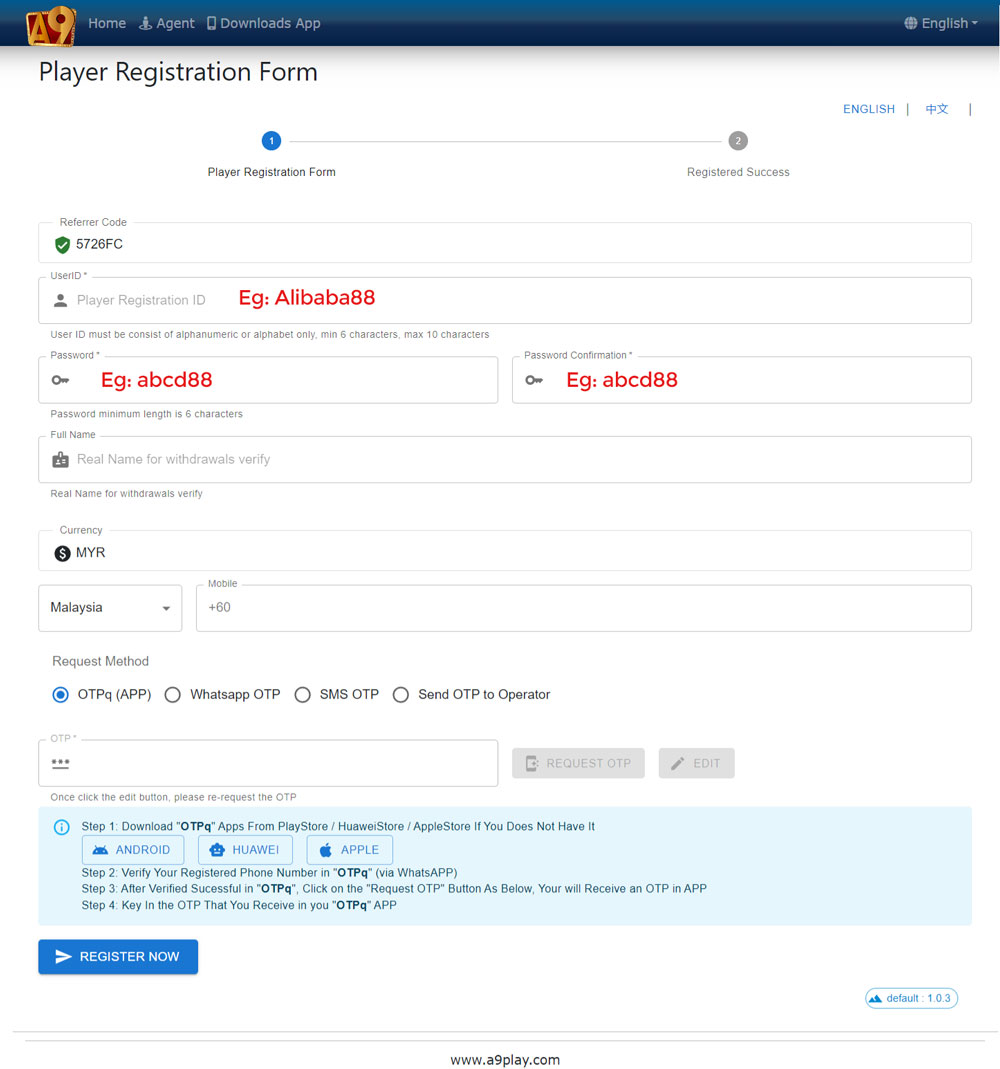
- When entering the registration page, you need to create a new login ID and are required to set a password.
- User ID last three characters cannot be all numbers, and the first character must start with a letter (a-z) with a length required of at least 6 and a maximum of 15 characters.
(For example: abcd88 or abc1d23) - Password needs to be at least 6 characters long and can either consist of all numbers or letters mixed with numbers.
(For example: 123488 or abc123)
STEP 2: Binding your phone number and email address
- Once you have completed setting your own User ID and Password.
- Click “Next” to enter the binding page.
- Fill in your mobile phone number or email address to receive the verification code.
- Once you have completed all the above steps, CONGRATULATIONS, you have created your own A9PLAY Account.
STEP 3: Download the “A9PLAY” App
- Download the “A9PLAY” App through A9play registration page or A9play download page.
- Once you have completed the installation of the “A9PLAY” app on your phone, you can start playing the games.